
Download KeyScrambler Personal – keylogger protection, keystroke encryption, secure typing, browser security, anti-keylogger tool
Overview
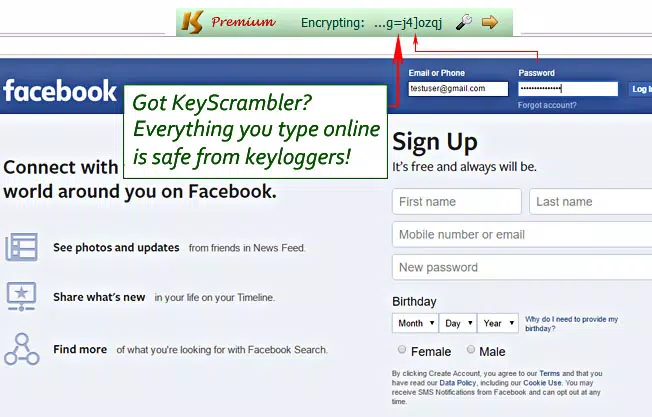
KeyScrambler Personal is a free security-focused tool designed to protect users from keyloggers during web browsing. The application operates at the keyboard driver level, encrypting keystrokes before they reach the operating system, thereby preventing unauthorized capture of sensitive data such as passwords, credit card numbers, and personal messages. This proactive defense mechanism ensures that even if a keylogger is present on the system, it can only record encrypted, indecipherable input.
The app is specifically tailored for individuals who prioritize online privacy and security, particularly those using public or shared computers, or frequently accessing financial or personal accounts online. Its design emphasizes seamless integration into daily workflows without requiring user intervention or technical knowledge. The developer, KeyScrambler, positions the tool as a reliable solution for both known and unknown keylogger threats, offering protection beyond traditional antivirus or anti-spyware detection methods.
KeyScrambler Personal is part of a broader ecosystem of cybersecurity utilities aimed at addressing increasingly sophisticated threats. While it does not replace antivirus software, it fills a critical gap by focusing on input-level protection. Real-world use cases include remote workers, online shoppers, and anyone concerned about data interception during web interactions. The tool’s ability to work across multiple browsers enhances its practical value in diverse digital environments.
Key Features & Functionality
- Keystroke Encryption at Driver Level: The application encrypts every keystroke at the keyboard driver layer, ensuring that data is protected before it enters the operating system’s input pipeline. This deep-level intervention makes it extremely difficult for keyloggers to extract meaningful information.
- Compatibility with Over 60 Browsers: KeyScrambler Personal supports a wide range of popular web browsers, including Chrome, Firefox, and Internet Explorer. This broad compatibility allows users to maintain consistent protection regardless of their preferred browsing platform.
- Protection Against Known and Unknown Threats: Unlike reactive security tools that rely on signature databases, KeyScrambler Personal defends against both identified and previously unseen keyloggers. This makes it effective against zero-day and polymorphic threats that evade traditional detection.
- Real-Time Decryption in Browsers: Encrypted keystrokes are decrypted in real time within the browser, ensuring users see exactly what they type. This maintains a natural typing experience without delays or disruptions.
- Minimal User Interaction Required: The tool is designed to be unobtrusive. Once installed, it runs in the background without requiring configuration or user input, making it accessible even to non-technical users.
For example, a user logging into a banking portal on a public computer can rely on KeyScrambler Personal to prevent any keylogger from capturing their credentials. Similarly, remote employees accessing corporate systems may benefit from an extra layer of defense against potential insider threats or malware.
Interface, UX & Performance
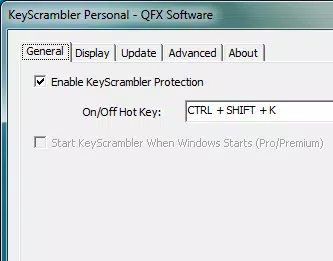
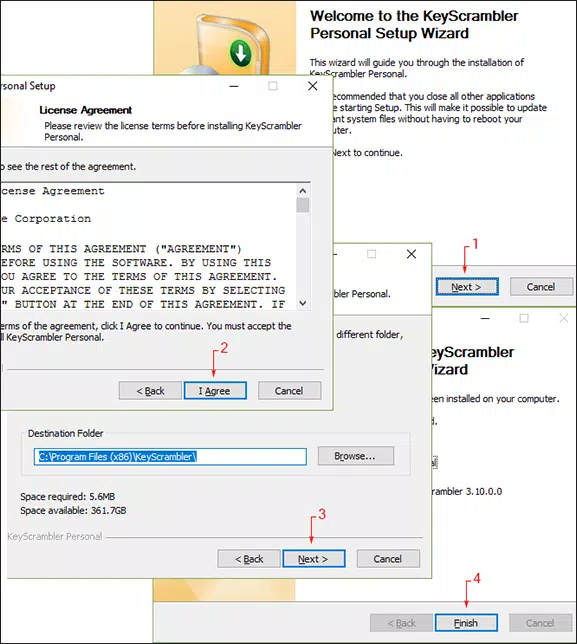
KeyScrambler Personal features a minimalistic interface that focuses on functionality over visual flair. The application runs in the background with no visible interface or dashboard, which aligns with its goal of being unobtrusive. Users are not required to interact with the app beyond the initial installation process.
Navigating the tool is not applicable, as it operates silently. However, this design choice enhances usability for non-technical users who may be overwhelmed by complex security software. The lack of pop-ups, settings menus, or alerts contributes to a smooth, uninterrupted experience.
Although the developer did not list formal performance metrics, the application’s lightweight nature—only 10.5 MB in size—suggests low resource consumption. It is expected to operate efficiently across various Windows device categories, including laptops, desktops, and older systems. Responsiveness is maintained due to the real-time decryption process, which ensures that keystrokes appear instantly in the browser.
Stability is likely high, given the app’s focus on core system-level operations without additional features. However, specific compatibility or crash reports were not disclosed.
Platform Compatibility & Technical Requirements
KeyScrambler Personal is available exclusively for the Windows platform. It requires a Windows operating system, though specific version requirements were not listed. The application has a file size of 10.5 MB, making it a lightweight download suitable for systems with limited storage.
The developer did not specify minimum OS requirements, so users should ensure compatibility with their current Windows environment. The app is distributed as a free tool, with no in-app purchases or subscription models. It is designed for desktop use and is not available on mobile platforms.
Pros and Cons
- Free to download and use with no hidden costs
- Encrypts keystrokes at the driver level for strong protection
- Compatible with over 60 popular web browsers
- Protects against both known and unknown keyloggers
- Operates silently without disrupting user workflow
- Real-time decryption ensures accurate typing experience
- Only available for Windows, not mobile or macOS
- No visible interface or user controls
- Specific OS version requirements not disclosed
- Does not replace antivirus or endpoint protection
- May not be suitable for users seeking full system monitoring
FAQ
Is KeyScrambler Personal safe to use?
Yes, the application is designed to operate securely at the system level. It does not collect user data and functions only to encrypt keystrokes before they are processed by the operating system.
Can I use KeyScrambler Personal on mobile devices?
Currently, the app is only available for Windows. There is no official version for Android or iOS devices.
Does KeyScrambler Personal require administrator rights to install?
The developer did not specify whether elevated permissions are required. However, given its system-level operation, it is likely that administrative privileges are needed during installation.
How often does the app update?
Specific update frequency was not provided. Users are advised to check the official website for the latest version and security patches.
Can KeyScrambler Personal be used alongside antivirus software?
Yes, it is designed to complement existing security tools. It does not conflict with antivirus or anti-spyware programs and can be used in conjunction with them for layered protection.
Final Thoughts
KeyScrambler Personal delivers a focused, effective solution for users concerned about keylogger threats during web browsing. Its unique approach—encrypting keystrokes at the driver level—offers a significant advantage over traditional detection-based tools. The app’s compatibility with over 60 browsers and its silent, unobtrusive operation make it ideal for both everyday users and professionals handling sensitive information.
While it lacks a user interface and is limited to Windows, these constraints are balanced by its lightweight design and strong security model. For individuals who value privacy and want an additional layer of protection without complexity, KeyScrambler Personal is a compelling choice.
Download KeyScrambler Personal now


